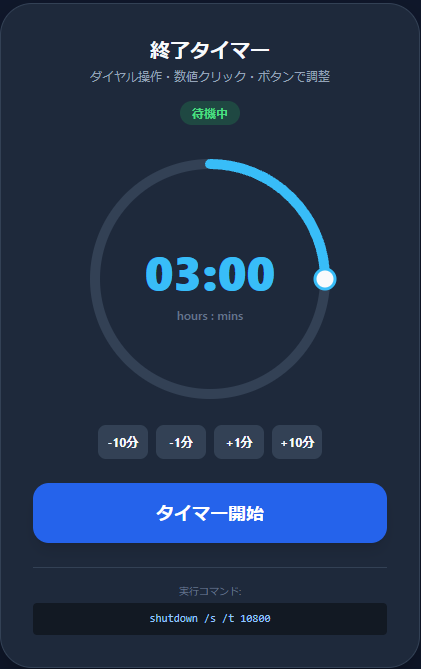
ブラウザで動くのWindows終了タイマーを作りました。
コードをメモ帳に貼りつけてファイル名を"Windows終了タイマー.html"と保存して動きます。
<!DOCTYPE html>
<html lang="ja">
<head>
<meta charset="UTF-8">
<meta name="viewport" content="width=device-width, initial-scale=1.0">
<title>Windows Shutdown Timer</title>
<script src="https://cdn.tailwindcss.com"></script>
<style>
body {
background: #0f172a;
color: #f8fafc;
font-family: 'Segoe UI', Meiryo, sans-serif;
display: flex;
justify-content: center;
align-items: center;
min-height: 100vh;
margin: 0;
touch-action: none;
}
.timer-card {
background: #1e293b;
padding: 2rem;
border-radius: 2rem;
box-shadow: 0 25px 50px -12px rgba(0, 0, 0, 0.5);
text-align: center;
width: 90%;
max-width: 420px;
border: 1px solid #334155;
}
.dial-container {
position: relative;
width: 260px;
height: 260px;
margin: 1rem auto;
cursor: pointer;
}
.dial-svg {
transform: rotate(-90deg);
}
.dial-bg {
fill: none;
stroke: #334155;
stroke-width: 10;
}
.dial-progress {
fill: none;
stroke: #38bdf8;
stroke-width: 10;
stroke-linecap: round;
transition: stroke-dashoffset 0.1s linear;
}
.dial-handle {
fill: #f8fafc;
stroke: #38bdf8;
stroke-width: 3;
cursor: grab;
}
.time-display-center {
position: absolute;
top: 50%;
left: 50%;
transform: translate(-50%, -50%);
display: flex;
flex-direction: column;
align-items: center;
}
.time-input {
background: transparent;
border: none;
color: #38bdf8;
font-size: 3rem;
font-weight: 800;
text-align: center;
width: 160px;
outline: none;
font-variant-numeric: tabular-nums;
}
.time-input:focus {
background: rgba(56, 189, 248, 0.1);
border-radius: 0.5rem;
}
.adjust-btn {
background: #334155;
color: #f8fafc;
padding: 0.5rem;
border-radius: 0.5rem;
font-size: 0.75rem;
font-weight: bold;
transition: all 0.2s;
min-width: 50px;
}
.adjust-btn:hover {
background: #475569;
}
.adjust-btn:active {
transform: scale(0.9);
}
.btn-primary {
background: #2563eb;
transition: all 0.2s;
}
.btn-primary:hover {
background: #3b82f6;
}
.btn-primary:active {
transform: scale(0.96);
}
.btn-abort {
background: #ef4444;
transition: all 0.2s;
}
.btn-abort:hover {
background: #dc2626;
}
</style>
</head>
<body>
<div class="timer-card">
<h1 class="text-xl font-bold mb-1">終了タイマー</h1>
<p id="instruction" class="text-slate-400 text-xs mb-4">設定後に開始コマンドを実行してね</p>
<div id="status-badge" class="inline-block px-3 py-1 rounded-full text-xs font-semibold bg-green-500/20 text-green-400 mb-2">
待機中
</div>
<div class="dial-container" id="dial-container">
<svg class="dial-svg" width="260" height="260" viewBox="0 0 260 260">
<circle class="dial-bg" cx="130" cy="130" r="115"></circle>
<circle id="progress" class="dial-progress" cx="130" cy="130" r="115"></circle>
<circle id="handle" class="dial-handle" cx="245" cy="130" r="10"></circle>
</svg>
<div class="time-display-center">
<input type="text" id="time-input" value="03:00" readonly class="time-input" title="クリックで直接入力">
<div class="text-slate-500 text-xs font-medium" id="unit-label">hours : mins</div>
</div>
</div>
<!-- Adjust Buttons -->
<div class="flex justify-center gap-2 mb-6" id="adjust-controls">
<button class="adjust-btn" onclick="adjustTime(-10)">-10分</button>
<button class="adjust-btn" onclick="adjustTime(-1)">-1分</button>
<button class="adjust-btn" onclick="adjustTime(1)">+1分</button>
<button class="adjust-btn" onclick="adjustTime(10)">+10分</button>
</div>
<div class="space-y-3">
<button id="startBtn" class="btn-primary w-full py-4 rounded-2xl font-bold text-white shadow-lg text-lg">
タイマー開始
</button>
<div id="active-controls" class="hidden space-y-3">
<button id="stopBtn" class="w-full py-4 bg-slate-700 hover:bg-slate-600 rounded-2xl font-bold text-white text-lg">
一時停止 (ブラウザのみ)
</button>
<button id="abortBtn" class="btn-abort w-full py-4 rounded-2xl font-bold text-white shadow-lg text-lg">
Windows終了を中止
</button>
</div>
</div>
<div class="mt-6 pt-4 border-t border-slate-700">
<p class="text-[10px] text-slate-500 mb-1" id="command-label">実行コマンド:</p>
<div class="relative group">
<code id="command-box" class="block bg-black/40 p-2 rounded text-blue-300 text-[11px] font-mono truncate">shutdown /s /t 10800</code>
</div>
<p class="text-[9px] text-slate-500 mt-2">※タイマー開始後、このコマンドをコマンドプロンプトに貼り付けてね</p>
</div>
</div>
<script>
const container = document.getElementById('dial-container');
const progress = document.getElementById('progress');
const handle = document.getElementById('handle');
const timeInput = document.getElementById('time-input');
const commandBox = document.getElementById('command-box');
const commandLabel = document.getElementById('command-label');
const startBtn = document.getElementById('startBtn');
const activeControls = document.getElementById('active-controls');
const stopBtn = document.getElementById('stopBtn');
const abortBtn = document.getElementById('abortBtn');
const statusBadge = document.getElementById('status-badge');
const instruction = document.getElementById('instruction');
const adjustControls = document.getElementById('adjust-controls');
const radius = 115;
const circumference = 2 * Math.PI * radius;
const MAX_MINUTES = 720; // 12 hours
let currentMinutes = 180;
let timerInterval = null;
let timeLeft = 0;
let isDragging = false;
progress.style.strokeDasharray = circumference;
function updateUI(mins) {
mins = Math.max(1, Math.min(mins, MAX_MINUTES));
currentMinutes = mins;
const h = Math.floor(mins / 60);
const m = mins % 60;
timeInput.value = `${h.toString().padStart(2, '0')}:${m.toString().padStart(2, '0')}`;
const offset = circumference - (mins / MAX_MINUTES) * circumference;
progress.style.strokeDashoffset = offset;
const angle = (mins / MAX_MINUTES) * 360 * (Math.PI / 180);
const x = 130 + radius * Math.cos(angle);
const y = 130 + radius * Math.sin(angle);
handle.setAttribute('cx', x);
handle.setAttribute('cy', y);
if (!timerInterval) {
commandBox.textContent = `shutdown /s /t ${mins * 60}`;
commandLabel.textContent = "実行コマンド:";
commandBox.classList.replace('text-red-400', 'text-blue-300');
}
}
function handleMove(e) {
if (!isDragging || timerInterval) return;
const rect = container.getBoundingClientRect();
const centerX = rect.left + rect.width / 2;
const centerY = rect.top + rect.height / 2;
const clientX = e.touches ? e.touches[0].clientX : e.clientX;
const clientY = e.touches ? e.touches[0].clientY : e.clientY;
let angle = Math.atan2(clientY - centerY, clientX - centerX) * (180 / Math.PI);
if (angle < 0) angle += 360;
updateUI(Math.round*1;
}
window.adjustTime = function(delta) {
if (timerInterval) return;
updateUI(currentMinutes + delta);
};
container.addEventListener('wheel', (e) => {
if (timerInterval) return;
e.preventDefault();
const delta = e.deltaY < 0 ? 1 : -1;
updateUI(currentMinutes + delta);
}, {passive: false});
timeInput.addEventListener('click', () => {
if (timerInterval) return;
timeInput.readOnly = false;
timeInput.select();
});
timeInput.addEventListener('blur', () => {
timeInput.readOnly = true;
parseInput();
});
timeInput.addEventListener('keypress', (e) => {
if (e.key === 'Enter') timeInput.blur();
});
function parseInput() {
const val = timeInput.value;
let mins = 0;
if (val.includes(':')) {
const parts = val.split(':');
mins = (parseInt(parts[0]) || 0) * 60 + (parseInt(parts[1]) || 0);
} else {
mins = parseInt(val) || 0;
}
updateUI(mins);
}
container.addEventListener('mousedown', () => isDragging = true);
window.addEventListener('mousemove', handleMove);
window.addEventListener('mouseup', () => isDragging = false);
container.addEventListener('touchstart', (e) => { isDragging = true; handleMove(e); }, {passive: false});
window.addEventListener('touchmove', handleMove, {passive: false});
window.addEventListener('touchend', () => isDragging = false);
function startTimer() {
timeLeft = currentMinutes * 60;
timerInterval = setInterval*2 * circumference;
} else {
stopTimer();
statusBadge.textContent = "終了";
}
}, 1000);
statusBadge.textContent = "実行中";
statusBadge.classList.replace('text-green-400', 'text-blue-400');
statusBadge.classList.replace('bg-green-500/20', 'bg-blue-500/20');
instruction.textContent = "タイマー稼働中...";
adjustControls.classList.add('opacity-30', 'pointer-events-none');
startBtn.classList.add('hidden');
activeControls.classList.remove('hidden');
}
function stopTimer() {
clearInterval(timerInterval);
timerInterval = null;
document.getElementById('unit-label').textContent = "hours : mins";
updateUI(currentMinutes);
statusBadge.textContent = "待機中";
statusBadge.classList.replace('text-blue-400', 'text-green-400');
statusBadge.classList.replace('bg-blue-500/20', 'bg-green-500/20');
instruction.textContent = "ダイヤル操作・数値クリック・ボタンで調整";
adjustControls.classList.remove('opacity-30', 'pointer-events-none');
startBtn.classList.remove('hidden');
activeControls.classList.add('hidden');
}
function abortShutdown() {
commandLabel.textContent = "中止用コマンド (実行して!):";
commandBox.textContent = "shutdown /a";
commandBox.classList.replace('text-blue-300', 'text-red-400');
stopTimer();
statusBadge.textContent = "中止待機";
}
startBtn.addEventListener('click', startTimer);
stopBtn.addEventListener('click', stopTimer);
abortBtn.addEventListener('click', abortShutdown);
updateUI(currentMinutes);
</script>
</body>
</html>